Architecture
The pieces that make up a Dockmesh installation, where each kind of state lives, and how a request or deploy travels through the system.
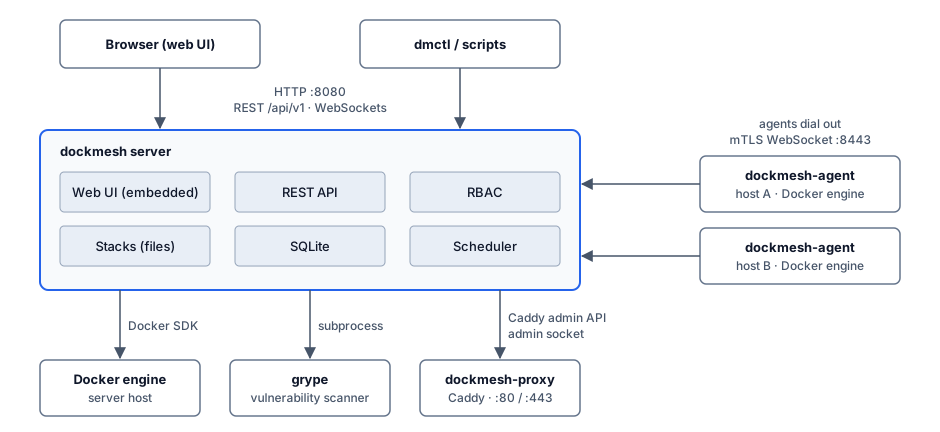
Dockmesh is one server binary, dockmesh. It serves the web UI and the REST API, talks to the Docker engine on its own machine, and accepts connections from agents on other machines. Two helpers are optional and run outside the binary: the Caddy reverse proxy (as a Docker container) and the Grype vulnerability scanner (as a subprocess).
Components
Section titled “Components”| Component | What it is | Notes |
|---|---|---|
dockmesh server | Go binary with the SvelteKit UI embedded | Listens on DOCKMESH_HTTP_ADDR (default :8080) for the UI and API, and on DOCKMESH_AGENT_LISTEN (default :8443) for agents. |
| Web UI | Single-page app served by the server | Fetches everything from /api/v1. There is no separate frontend server. |
| SQLite database | modernc.org/sqlite, file at DOCKMESH_DB_PATH (default ./data/dockmesh.db) | The only supported database. |
| Local Docker engine | Reached through the Docker SDK | Connection settings come from the standard Docker environment (DOCKER_HOST etc.), usually the local socket. Dockmesh never shells out to the docker CLI. |
dockmesh-agent | Small binary on each remote host | Dials out to the server over a mutual-TLS WebSocket and runs Docker operations locally on the server’s behalf. See Hosts and agents. |
| Reverse proxy | Docker container dockmesh-proxy running a pinned, tested caddy image (or DOCKMESH_PROXY_IMAGE) | Only exists when the proxy is enabled (DOCKMESH_PROXY_ENABLED=true or the proxy_enabled setting). Dockmesh configures it over Caddy’s admin API on a private Unix socket. See Reverse proxy. |
| Vulnerability scanner | External grype binary, run as a subprocess | scripts/install.sh installs it unless DOCKMESH_NO_SCANNER=1. The Dockerfile in the repository does not include it. Binary path: DOCKMESH_SCANNER_BINARY (default grype). See Vulnerability scanning. |
dmctl | Command-line client | Talks to the same REST API with an API token or a username and password. See dmctl. |
Caddy and Grype are not compiled into Dockmesh. If the proxy is off and Grype is not installed, the server runs fine without them; only those features are unavailable.
Where state lives
Section titled “Where state lives”Dockmesh splits state between the filesystem and the database on purpose.
On the filesystem (source of truth for what runs):
- Stack definitions:
<stacks root>/<name>/compose.yaml, the stack’s.envor encrypted.env.age, optionalcompose.<env>.yamloverride files and.dockmesh.meta.json. The stacks root isDOCKMESH_STACKS_ROOT(default./stacks). See Stacks. - The data directory, which is the directory containing the database file. It holds the internal CA and server certificate for agents and the git-source cache (
git-cache/). The JWT secret (secrets.env,DOCKMESH_SECRETS_PATH) and the age key used to encrypt stack secrets (secrets.age-key,DOCKMESH_SECRETS_KEY_PATH) are in./databy default too, but their paths do not followDOCKMESH_DB_PATH. A local backup target without a path writes tobackups/in the data directory (see Backups).
In SQLite (runtime and management state):
- Users, sessions, roles, permissions, scopes, API tokens, invites, SSO provider configuration.
- Which host each stack is deployed on, deploy history, stack dependencies, git-source bindings, templates, global environment variables.
- Agents and host tags, backup jobs and runs, alert rules and history, notification channels, proxy routes, registry credentials, scan results, metrics history, the audit log and settings.
Compose files are never stored only in the database. If you lose the database you still have every stack on disk, but you lose users, deployment records and history. Back up both; the system backup covers the database, the stacks directory and the data directory. See Backups and Filesystem layout for the full tree.
How a request flows
Section titled “How a request flows”- The browser or
dmctlsends a request to/api/v1/...with a bearer token. Browser sessions use a 15-minute access token plus a refresh token; scripts use API tokens (dmt_...). - The auth middleware checks the token and evaluates the user’s current assignments on every request, so access changes take effect immediately.
- Most routes are gated by one permission such as
stacks.deploy. Handlers that act on a specific host or stack also check scope. See Permissions. - The handler picks the target host from the
?host=query parameter. No parameter orlocalmeans the local host; an agent ID means that remote host. List endpoints also accept?host=alland query every online host in parallel. - For the local host the server calls the Docker SDK directly. For a remote host it sends a request frame over the agent’s WebSocket and waits for the reply.
Live logs, exec shells, container stats and the event feed run over WebSockets under /api/v1/ws/. The UI first gets a short-lived, single-use ticket for one permission from POST /api/v1/ws/ticket, then opens the socket with it.
How a deploy flows
Section titled “How a deploy flows”- You click Deploy (or run
dmctl stacks deploy). The server readscompose.yamland the decrypted.envfrom the stack directory, and merges global environment variables. Stacks it depends on that aren’t running on the target host yet are deployed first, in dependency order. If an environment override is active, it is merged intocompose.yamlfirst, interpolated with the same environment (global variables plus the stack’s.env). - The server sends the compose text and environment to the target: the local host, or the agent on a remote host.
- On the target, Dockmesh writes both into a temporary staging directory, parses them with the Compose library, and reconciles with the Docker SDK: networks, then volumes, then image pulls, then each service in alphabetical order (remove the old container, create, start, wait for health).
- The server records which host the stack is on and adds a deploy-history entry. For remote hosts it also pushes a copy of the stack files to the agent.
The deploy runs inside the HTTP request. The details of what reconcile does, including which Compose fields are honoured, are in Stacks.
Ports at a glance
Section titled “Ports at a glance”| Port | Listener | Who connects |
|---|---|---|
8080/tcp | UI, REST API, WebSockets, /metrics, agent install script and binaries (/install/) | Browsers, dmctl, hosts running the agent installer |
8443/tcp | Agent enrollment (/enroll), mTLS WebSocket (/connect) and agent upgrade downloads | Agents only |
80/tcp, 443/tcp | Caddy in dockmesh-proxy (host network) | Your users, only when the proxy is enabled |
The 8080 listener speaks plain HTTP. Put TLS in front of it with a reverse proxy, or use the managed proxy. See Ports and Security hardening.